


BillOut - Bill Organizer
4.7206.00 Reviews
App Specs
- Version
- 4.0.3
- Updated On
- License
- Free
- Downloads
- 50,000+
- Developer
- Pierre Valere
- Categories
- Finance
- Platform
- Android
Screenshots
 Analysis by AppCompare
I think a bill organizer is most useful when it answers a small, practical question at the right moment: what needs attention before my next payday? BillOut - Bill Organizer is built around that everyday problem rather than trying to replace a full banking or budgeting app. That narrower focus can be a real advantage if you mainly want to keep due dates visible, but it also means I’d treat it as a companion for planning, not as proof that a payment has been made.
A focused tool for keeping dates in view
BillOut is a free finance app from developer Pierre Valere. It has a 4.7 average from around 1,000 ratings, and more than 50,000 installs. Those figures suggest that plenty of people are looking for this kind of simple bill-tracking help, though popularity alone is not a reason to hand any financial app more information than its job requires.
The key distinction I keep in mind is that a reminder is not the same as a transaction. A due-date alert can help me remember to visit a provider’s website or open a banking app, but it does not, by itself, settle the bill. That makes BillOut most appealing to someone who wants a clear personal checklist and is comfortable handling the actual payment elsewhere.
Make a small, useful bill routine
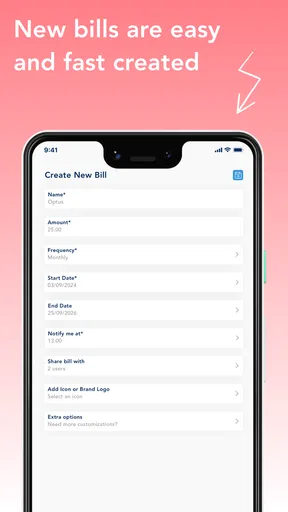
Rather than entering every expense in one sitting, I’d start with the bills that are easiest to forget or that have a firm deadline: rent, utilities, a loan payment, or a subscription billed on an irregular date. For each one, the useful details are its name, amount, due date, and recurrence. Once the essentials are there, the list can become a practical monthly check-in instead of a large data-entry project.
One less-obvious way to use categories is as a review aid, not just a filing system. Separating household utilities from subscriptions and loans can make a quick scan more informative: if a category contains several small recurring charges, I can decide whether to review those services outside the app. The organizer can help me notice what deserves attention, but it cannot decide whether a charge is worthwhile or cancel it for me.
For a realistic routine, imagine that I check the app at the start of the week, see a utility bill coming due, and use the reminder as a prompt to confirm the amount with the provider before paying through my normal channel. Afterward, I can return to my own records to keep track of what I handled. That extra confirmation matters when amounts vary from month to month; a saved figure should not automatically be treated as the current bill.
Trust, controls, and the limits of a reminder
Because bill details can reveal a lot about someone’s household and commitments, I would be selective about what I enter. A bill name and a due date may be enough for a reminder; there is little reason to add sensitive details that are not needed for that purpose. I would also avoid treating a bill organizer as a place to store account credentials or payment-card information unless I had a clear, verified reason to do so.
Worth Reading Before You Choose

EA SPORTS FC Mobile 26 Is a Bigger Football Game, but It Takes Time

Flipboard Shows What News Apps Must Do Beyond the Feed

Switching to Android Auto Means Rethinking Your Driving Routine

Google Calendar Makes a Crowded Week Easier to Manage

Ludo King Makes the Most of the Minutes Between Plans

Baby Panda World Brings Quick Play to Modern Phones, but Its Game Library Feels Busy
What I would check before relying on alerts
Reminder usefulness depends on more than a setting inside an app. On a new phone, after an operating-system update, or when battery-saving settings are changed, I would check that notifications are allowed and that the next alert is still scheduled as expected. I’d also keep an independent note for any payment where a missed deadline would have serious consequences. That is not a criticism unique to BillOut; it is a sensible backup for any reminder system.
There is also a practical trade-off in how much detail to record. Entering an exact amount can make a list more helpful, but variable bills can make that figure stale. For those, I would use the saved entry primarily to remember the due date and check the current statement before paying. For a fixed subscription, a stored amount may be more useful as a quick reference, while still being worth checking periodically for changes.
Who benefits, and who may prefer another approach
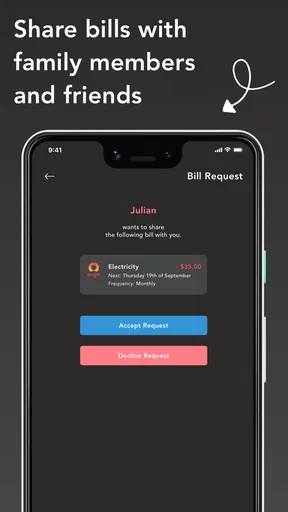
I can see this working well for someone who pays bills manually, has several recurring obligations, and wants one place to review upcoming dates. It may also help a household member who handles reminders while another person makes payments, provided they agree on how the list is maintained. A shared process is only useful if someone owns the routine of updating amounts and marking what has been dealt with.
On the other hand, if I wanted automatic account connections, a complete spending analysis, or payment execution inside the same product, I would look for a finance service that explicitly offers and explains those capabilities. A spreadsheet or calendar can be a better fit for someone who wants full control over how data is stored and already has a reliable reminder habit. BillOut’s strength is its bill-focused structure, not a promise to manage every part of personal finance.
First Impressions
Jumping into BillOut - Bill Organizer is like stepping into a well-organized office space. The interface is sleek and intuitive, making it super easy to navigate. I was able to set it up in just a few minutes, which is perfect if you’re like me and have zero patience for long-winded tutorials. The design isn’t just about aesthetics; it’s practical. Everything is just where you’d expect it to be, so you’re not left hunting around for features.
Key Features
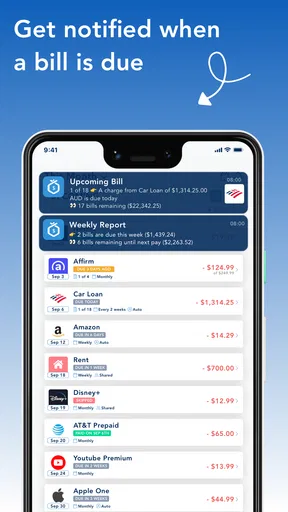
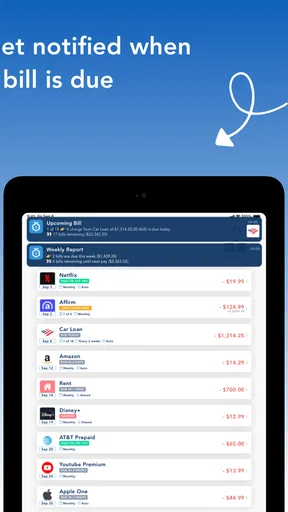
So what does this app actually do? Well, it’s packed with features that make managing bills less of a headache. You can add all your bills in one place and set up reminders so you never miss a due date. The reminders are customizable, which is a neat touch, allowing you to choose how and when you’re notified.
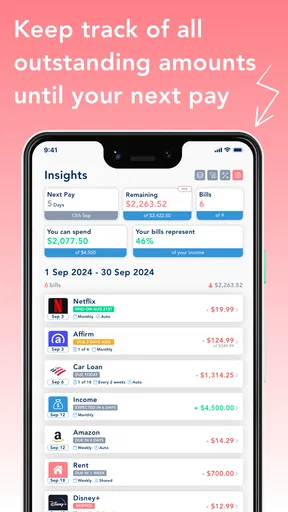
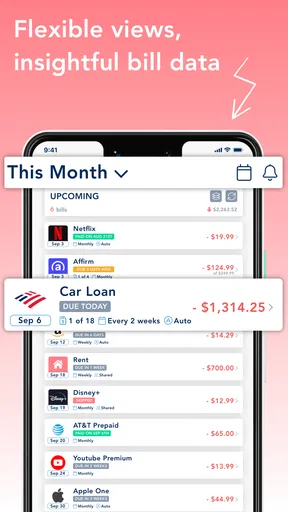
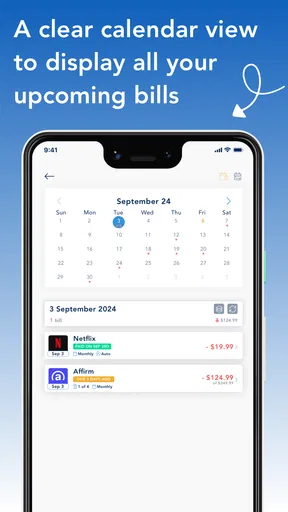
Another feature I loved is the categorization. You can sort your bills into different categories like utilities, subscriptions, and loans. It’s super handy for getting a quick overview of where your money is going. Plus, there’s a visual dashboard that gives you a snapshot of your upcoming expenses, which I found incredibly helpful.
Ease of Use
Let’s talk about the user experience. I’m not exactly tech-savvy, but using this app was a breeze. Adding and managing bills is straightforward, and the app doesn’t bombard you with unnecessary options. It’s all about getting the job done without any fuss. I particularly appreciated the ability to sync across devices, meaning I could access my bill information on both my phone and tablet. It’s all about convenience, right?
Why It Stands Out
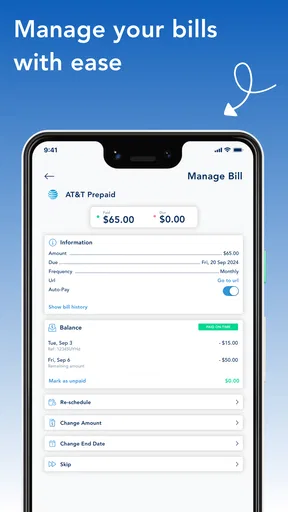
What makes BillOut - Bill Organizer stand out from the crowd? It's the level of detail and customization it offers. Unlike other apps that feel like a one-size-fits-all solution, BillOut allows you to tailor your experience. This means setting specific due dates, amounts, and recurrence for each bill. It’s all about making the app work for you, not the other way around.
“Simplicity is the ultimate sophistication.”
This quote pretty much sums up the app. Its simplicity doesn’t mean it lacks power or functionality. Instead, it focuses on what users really need and delivers it in a clean, efficient manner.
Security and Support
We all know how crucial security is when dealing with financial data. Thankfully, BillOut takes this seriously with top-notch encryption to keep your information safe. I felt confident knowing my data was protected. And if you ever run into issues, their support team is responsive and helpful, which is always a big plus in my book.
Conclusion
In a world where managing finances can often feel overwhelming, BillOut - Bill Organizer offers a refreshing solution. It’s efficient, user-friendly, and packed with features that genuinely make life easier. Whether you’re trying to avoid late fees or just want a clearer picture of your financial landscape, this app is definitely worth a shot. So, if you’re ready to take control of your bills and enjoy a little more peace of mind, give BillOut a download. You might just wonder how you ever managed without it!
Pros
- Intuitive interface for easy bill management.
- Customizable reminders prevent missed payments.
- Secure data encryption for user privacy.
- Supports multiple currencies for global use.
- Detailed spending reports and analytics.
Cons
- Limited free version features.
- No integration with some banking apps.
- Occasional sync issues reported.
- Ads in the free version can be intrusive.
- Requires internet for full functionality.
FAQs for BillOut - Bill Organizer
What is BillOut - Bill Organizer, and how does it work?
BillOut - Bill Organizer is a comprehensive app designed to help you manage and organize your bills efficiently. It allows you to track due dates, set reminders, and categorize expenses. With its intuitive interface, you can quickly input billing information and receive notifications to ensure you never miss a payment. It also supports various currencies, making it ideal for international users.
Is my financial data safe with BillOut - Bill Organizer?
Yes, BillOut - Bill Organizer prioritizes user security. The app employs encryption to protect your data and ensures that your information is stored securely. Additionally, it does not share your personal data with third parties without your consent. Regular updates are also provided to address any security vulnerabilities.
Does BillOut offer integration with other financial apps or services?
BillOut - Bill Organizer offers integration with several popular financial apps and services, enabling seamless synchronization of your financial data. It supports syncing with major banking apps, allowing you to import transactions and keep your records up to date. Check the app’s settings for a list of compatible services.
Can I customize reminders and notifications for my bills?
Absolutely, BillOut provides flexible options for customizing reminders and notifications. You can set alerts for upcoming due dates, overdue payments, and even schedule recurring notifications. This feature ensures you stay informed and can adjust the frequency and timing of alerts to suit your needs, reducing the risk of missing payments.
Is BillOut - Bill Organizer free to use, and are there any in-app purchases?
BillOut - Bill Organizer offers a free version with basic features that are sufficient for most users. However, there are in-app purchases available, such as premium subscriptions that offer advanced features like detailed analytics, ad-free experiences, and additional customization options. Prices and features may vary, so check the app store for specific details.


